
Jitter and Ping: The Ultimate Guide to Better Speed
Table of Contents
When people troubleshoot internet problems, they usually focus on download speed, but two other metrics, Jitter and Ping, often play an equally important role in whether an online experience actually feels smooth and responsive. Nowhere is this more apparent than in competitive gaming, video calls, and any real-time application where a fast download speed alone cannot compensate for an inconsistent or laggy connection. This guide explains exactly what ping and jitter measure, why they matter, and practical steps to improve them.
What Ping Actually Measures
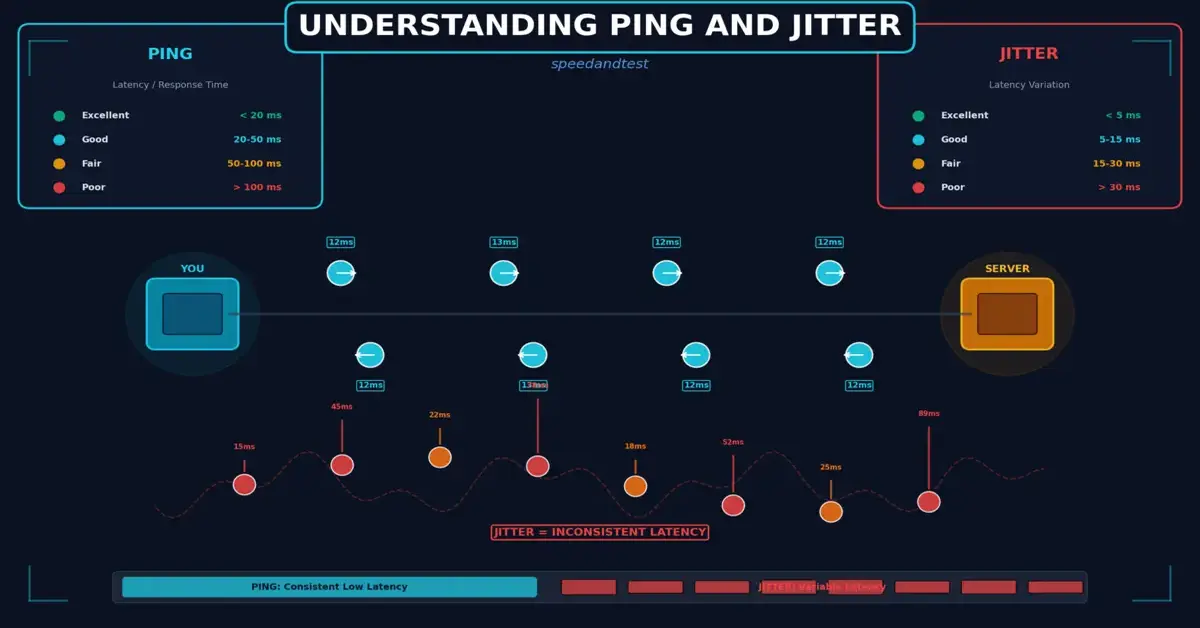
Ping, more formally known as latency, measures the round-trip time it takes for a small packet of data to travel from your device to a destination server and back again, typically expressed in milliseconds. A lower ping number means less delay, and therefore a more immediately responsive connection. Ping is fundamentally different from download or upload speed; a connection can have excellent bandwidth but still suffer from high ping if the data has to travel a long physical distance or pass through many network hops along the way.
What Causes High Ping
Several factors contribute to ping, including the physical distance data must travel, the number of network hops between your device and the destination server, the quality and congestion level of the networks along that path, and the type of connection you are using. Satellite connections, for example, inherently have higher ping due to the enormous physical distance signals must travel to and from orbiting satellites, regardless of how well-optimized the rest of the network is.

What Jitter Measures and Why It Matters
Jitter measures the variation in ping over time, rather than the ping value itself. A connection with consistently high but stable ping can actually feel smoother for certain applications than one with lower average ping but wildly fluctuating values from one moment to the next. High jitter causes noticeable problems in real-time applications: choppy audio during video calls, stuttering in online games, and generally unpredictable performance even when average speed and latency numbers look reasonable on paper.
Why Jitter and Ping Matter More for Some Activities Than Others
Not every online activity is equally sensitive to Jitter and Ping. Web browsing and video streaming, which rely on buffering ahead of playback, tolerate moderate ping and jitter without any noticeable impact on the user experience. Real-time applications, by contrast, are highly sensitive to both metrics. Competitive online gaming requires low, consistent ping to ensure your actions register accurately and promptly. Video conferencing depends on low jitter to maintain clear, synchronized audio and video. Voice-over-IP calling is similarly sensitive, with high jitter often manifesting as robotic-sounding or choppy audio.

Good, Acceptable, and Poor Ping Values
While specific thresholds vary somewhat by application, general guidelines help contextualize your own results. Ping under 20 milliseconds is considered excellent, generally imperceptible to users even in the most demanding real-time applications. Ping between 20 and 50 milliseconds is good for most purposes, including competitive gaming. Ping between 50 and 100 milliseconds remains acceptable for most applications but may become noticeable in fast-paced competitive gaming. Ping above 100 milliseconds becomes increasingly noticeable as input lag or delayed responses in real-time applications, and above 150 to 200 milliseconds, most real-time applications become genuinely difficult to use comfortably.
How to Reduce Your Jitter and Ping
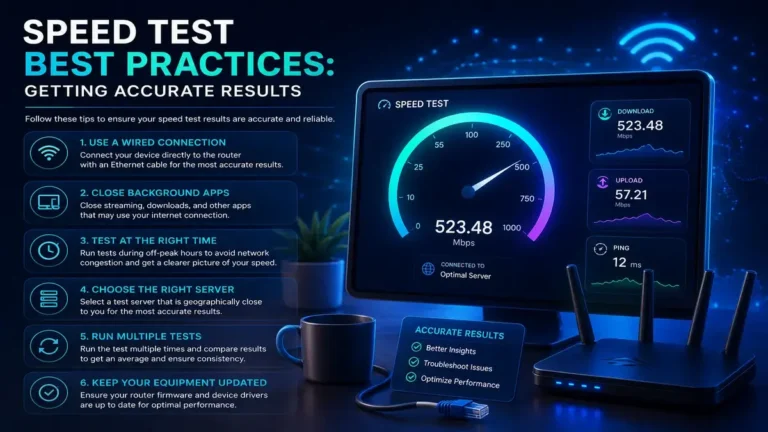
Several practical steps can meaningfully reduce jitter and Ping for latency-sensitive activities. Using a wired Ethernet connection instead of Wi-Fi eliminates wireless processing overhead that adds a small but measurable amount of latency. Closing bandwidth-heavy background applications reduces network congestion that can indirectly increase effective latency during periods of high local network usage. For gaming specifically, choosing game servers geographically closer to your actual location, when the option is available, directly reduces the physical distance data must travel.
Jitter and Ping for Remote Work Applications
Beyond gaming and calls, many remote work tools, including screen sharing applications, remote desktop software, and collaborative editing platforms, depend on responsive, low-latency connections to feel natural rather than sluggish. A remote desktop session with high ping can make simple actions like moving a cursor or typing feel noticeably delayed, while high jitter can cause remote screen updates to appear jerky or momentarily frozen. For professionals who rely heavily on these tools, prioritizing a stable, low-latency connection, potentially including a wired setup for a dedicated work computer, can meaningfully improve daily productivity and reduce the subtle fatigue that comes from constantly working against a laggy interface.
How to Reduce Jitter and Ping
Reducing Jitter and Ping often overlaps with general network stability improvements. A wired connection provides more consistent performance than Wi-Fi, which is subject to interference and signal variability that directly contributes to jitter. Enabling Quality of Service settings on your router to prioritize real-time traffic, such as video calls or gaming, over less time-sensitive background activity like large downloads, helps maintain more consistent latency for the applications where jitter and ping matter most.
The Role of Traceroute in Diagnosing Latency Issues
For those wanting to dig deeper into a persistent ping problem, a traceroute tool, available on virtually every operating system, shows each network hop your data passes through on its way to a destination, along with the latency at each hop. This can help identify whether a delay is occurring on your own local network, somewhere within your internet service provider’s infrastructure, or further along the broader internet path outside anyone’s direct control. While interpreting traceroute results requires some technical familiarity, sharing this output with your provider’s support team when troubleshooting a persistent latency issue often leads to a faster, more targeted resolution than a general complaint alone.
Testing Your Jitter and Ping
Most internet speed testing tools report Jitter and Ping alongside download and upload speed, though not all report jitter by default. When troubleshooting a specific real-time application’s performance, testing against servers geographically close to that application’s actual infrastructure, rather than a generic nearby speed test server, provides a more relevant picture of the latency you will actually experience during real use of that specific service.
How This Connects to Broader Network Concepts
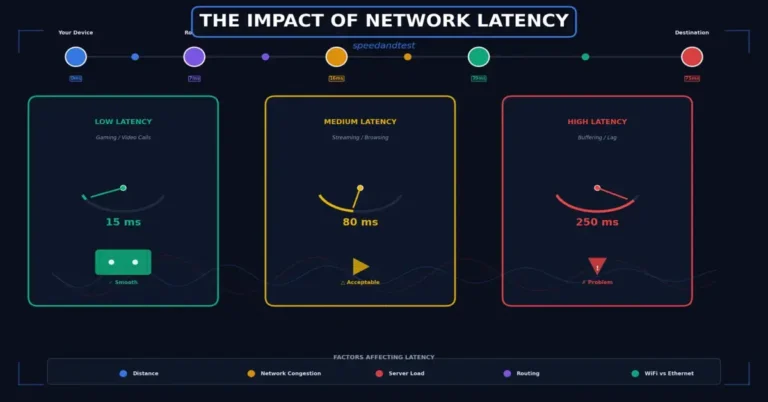
Jitter and Ping are closely related to the broader concept of network latency discussed throughout our other network performance content. See our article on the impact of network latency for a deeper dive into how latency affects different applications, and our guide on streaming quality and bandwidth for how these concepts apply specifically to video streaming.
Jitter and Ping in Video Conferencing
Video conferencing platforms have become central to both professional and personal communication, and both Jitter and Ping directly shape how natural and usable these calls feel. High Jitter and ping introduce a noticeable delay between when someone speaks and when you hear them, which can lead to awkward interruptions as both participants unintentionally talk over each other, unsure whether the other person has finished speaking. High jitter compounds this problem by causing audio and video to arrive inconsistently, resulting in choppy, robotic-sounding speech and momentarily frozen video frames even when the underlying connection has adequate raw bandwidth for the call.
Most modern video conferencing platforms include some degree of jitter buffering, a technique that temporarily holds incoming data to smooth out minor timing inconsistencies before playback, effectively trading a small amount of additional delay for improved consistency. While this helps mask moderate Jitter and Ping, severe or highly variable jitter can still overwhelm these buffering techniques, resulting in the noticeably degraded call quality that most people have experienced at some point during an important video meeting.
The Relationship Between Network Congestion Jitter and Ping
Jitter often increases during periods of network congestion, since congested network equipment must queue and process a larger volume of traffic, introducing variable delays as packets wait their turn rather than being processed immediately upon arrival. This is part of why jitter tends to worsen during peak usage hours in shared network infrastructure, even when overall bandwidth remains technically sufficient for the task at hand. Understanding this relationship helps explain why a connection might perform well for real-time applications during quiet periods but struggle noticeably during your neighborhood’s busiest hours.
Cloud, Jitter and Ping, Gaming Services
Cloud gaming services, which stream gameplay video from a remote server rather than running the game locally on your device, are exceptionally sensitive to both Jitter and Ping, arguably more so than any other common consumer application. Since every input you make must travel to a remote server, be processed, and the resulting video frame streamed back to your device, both consistently low ping and minimal jitter are essential for the experience to feel responsive rather than frustratingly delayed. This is why cloud gaming services typically recommend wired connections and publish specific latency requirements considerably stricter than those suggested for traditional streaming video.
Frequently Asked Questions
What is a good ping for competitive online gaming?
Ping under 30 milliseconds is generally considered excellent for competitive gaming, while 30 to 60 milliseconds remains good for most games and most players’ skill levels.
Can I have fast download speed but still have high ping?
Yes, absolutely. Download speed and ping measure different aspects of a connection, and a fast connection can still have relatively high latency depending on network path and distance to the destination server.
Does the server location I connect to affect ping significantly?
Yes, substantially. Physical distance is one of the largest contributors to ping, so choosing a geographically closer server, when the option is available, often produces the single largest improvement.
Does Wi-Fi always cause higher ping than Ethernet?
Generally yes, though the difference is often small under good conditions. Wi-Fi adds some processing overhead and is more susceptible to interference, both of which can increase Jitter and Ping compared to a direct wired connection.
What is traceroute and when should I use it?
Traceroute shows each network hop your data passes through to a destination along with the latency at each step, useful for pinpointing where a persistent latency problem originates when basic troubleshooting has not resolved it.
Why does my ping spike occasionally even on a stable connection?
Occasional ping spikes can result from brief network congestion, background processes suddenly using bandwidth, or momentary issues at any point along the network path between your device and the destination server.
Does remote desktop software need lower ping than video streaming?
Yes. Remote desktop and screen sharing tools require immediate responsiveness to input, making them considerably more sensitive to ping than video streaming, which tolerates delay through buffering.
Is high jitter worse than high ping for video calls?
For video calls specifically, high jitter is often more disruptive than moderately high but stable ping, since jitter causes the noticeable stuttering and audio artifacts that make calls difficult to follow.
Can a VPN improve my ping for gaming?
Occasionally, if the VPN routes traffic through a more efficient path than your default route, though in most cases a VPN adds some latency rather than reducing it, so testing with and without is worthwhile.
What is jitter buffering and how does it help?
Jitter buffering temporarily holds incoming data to smooth out timing inconsistencies before playback, trading a small delay for more consistent audio and video, commonly used in video calling applications.
Why is cloud gaming more sensitive to latency than regular streaming?
Cloud gaming requires your input to travel to a remote server and the resulting video to stream back in real time, making both Jitter and Ping far more noticeable than in traditional video streaming, which simply buffers ahead.
Does network congestion affect jitter more than ping?
Congestion tends to increase both, but its effect on jitter can be especially pronounced, since congested equipment processes traffic with variable, unpredictable delays rather than a consistent, minor delay increase.
Can upgrading my internet plan reduce ping?
Not necessarily. Ping is more related to network path and distance than raw bandwidth, so a faster plan on the same network path may not meaningfully reduce ping, though it can help with congestion-related jitter.
Understanding Jitter and Ping, and how they differ from raw bandwidth, helps explain why some connections feel smooth and responsive while others feel frustrating despite similar advertised speeds. According to Cloudflare’s latency glossary, understanding these distinct metrics provides a more complete picture of connection quality than speed alone ever could.
One Comment