Bandwidth Test Website: Unlock Better Results
Table of Contents
Run the same home connection through three different bandwidth test websites, one after another, and you’ll often get three noticeably different numbers back. That’s not a glitch or a fluke in your connection. It’s a direct, predictable result of how each site is built, where its test servers physically sit, and sometimes who’s quietly paying its bills. If you’ve ever wondered why your results don’t match what a friend gets on a different site, or why your ISP’s own tester always shows better numbers than everyone else’s, the answer is in the tool itself, not just your connection.
This is a guide to choosing a bandwidth test website you can actually trust, not another walkthrough of how to click a button and read a number. By the end, you’ll know exactly what separates an accurate result from a misleading one, and you’ll have a short checklist you can run through in under a minute the next time a number surprises you.
Why Bandwidth Test Websites Don’t All Agree
Every bandwidth test website runs the same basic process: send data, measure how fast it moves, report a number. The differences that cause wildly different results come from a handful of specific factors.

Server location. A test that connects you to a server across the country adds latency and distance that has nothing to do with your actual home connection. The closer the test server, the more accurate the reading.
Test methodology. Some tools run a short burst test; others sustain the connection longer to catch throttling that only kicks in after a few seconds. A short test can miss real-world slowdowns entirely.
Server load. A popular testing site with thousands of simultaneous users hitting the same server pool can return lower numbers simply because its own infrastructure is under strain, not because your connection is slow.
Who owns the tool. Some bandwidth test websites are run independently. Others are owned or sponsored by the very ISPs whose speeds they’re measuring, which creates an obvious incentive to show favorable numbers.
Browser and device state. Background tabs, extensions, and other apps quietly using your connection while a test runs can shave real numbers off a result that has nothing wrong with the underlying line at all.
What Makes a Bandwidth Test Website Trustworthy
Knowing what to look for turns “which site should I use” from a guessing game into an actual checklist.
Independent Ownership
A tool with no financial stake in your ISP’s reputation has no reason to skew results in anyone’s favor. Independently run testers are generally more reliable than ones bundled directly into your provider’s own app or website.
Multiple Server Options
The best bandwidth test websites let you choose or automatically detect a nearby test server, rather than routing everyone through one fixed location regardless of where they actually are.
Transparent Methodology
Sites that explain how they measure download, upload, ping, and jitter, and for how long, give you a way to judge whether their numbers reflect sustained real-world performance or just a quick best-case burst.
No Required Downloads or Plugins
A trustworthy modern bandwidth test website runs entirely in your browser. Anything asking you to install a separate app just to check your speed is worth extra scrutiny, especially on mobile.
Consistent Results Across Repeated Tests
Run the same test three times in a row. A reliable site will give you numbers in a tight, believable range. Wild swings from one run to the next, with nothing else on your network changing, are a red flag for the tool itself, not necessarily your connection.
HTML5 vs. Older Testing Methods
Older bandwidth test websites relied on Flash or Java applets to run their measurements, both of which are effectively dead technology now. Modern tools use HTML5, which runs natively in every current browser without a plugin, loads faster, and tends to produce more consistent results because it isn’t fighting browser security restrictions or outdated runtimes.
If a site you’re using still asks you to install or enable a plugin to run a test, that’s a strong sign it hasn’t been updated in years, and its results shouldn’t be trusted over a modern alternative.
How Ad-Funded Tools Can Skew What You See
Plenty of free bandwidth test websites run on advertising, which isn’t inherently a problem;m, plenty of excellent tools support themselves this way. But it’s worth understanding the incentive it creates: a site earning revenue from repeat visits benefits from you coming back often, which sometimes means results are presented in ways that encourage more testing rather than a fast, honest answer.
This doesn’t mean every ad-supported tool is untrustworthy. It means the business model is worth being aware of, the same way you’d want to know if a product review site also sold the products it reviewed.
A Simple Way to Cross-Check Any Result
You don’t need to fully audit a bandwidth test website’s back end to sanity-check what it tells you. A few practical steps go a long way.

- Run the same test twice in a row, a few minutes apart, with nothing else active on your network. Consistent numbers are a good sign.
- Try a second, independent site and compare. Numbers within a reasonable range of each other build confidence; wildly different results mean at least one tool has a problem.
- Test at a quiet time and a busy time. A trustworthy site will show you the real difference between off-peak and peak-hour performance, not paper over it.
- Check whether the site discloses its server locations. Transparency here is a strong signal the tool isn’t hiding anything else.
- Test over both Wi-Fi and a wired connection if you can. A believable bandwidth test website should give you a meaningfully higher, more stable reading over Ethernet, since that matches how networking actually works.
Quick Red Flags to Watch For
- Results that vary wildly between back-to-back tests with nothing else running
- No visible information about server location or test duration
- Requires a plugin or app install to function
- Owned by your ISP with no independent alternative offered for comparison
Try Our Bandwidth Test
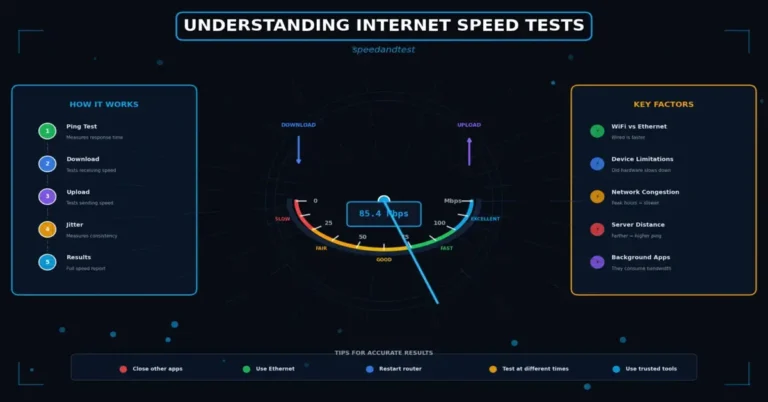
Our own speed test runs in your browser with no downloads required, and feeds straight into our Internet Performance Analyzer, so you get a raw bandwidth number and a real breakdown of what it means for streaming, gaming, and video calls in one place. If you want the fundamentals first, our guide to understanding internet speed tests covers exactly what download, upload, and ping measure.
Testing on Mobile vs. Desktop
The device you test from changes what you’re actually measuring, and it’s worth understanding before you compare results across devices.

A phone connected to Wi-Fi shares the same network path as a laptop in the same room, but phones often have weaker antennas and more aggressive power-saving behavior, which can shave real throughput off a result even on an identical connection. Testing on cellular data measures something completely different: your mobile carrier’s network, not your home internet at all, so comparing a cellular result against your home Wi-Fi number is comparing two unrelated things.
For the most accurate read on your actual home connection, a laptop or desktop on Wi-Fi, or better yet plugged directly into your router, gives you the cleanest number. Mobile testing is genuinely useful, just for a different question: how well your carrier’s network performs where you are, not how fast your home internet is.
What a Bandwidth Test Website Can’t Tell You
Even the best bandwidth test website has real limits, and knowing them keeps you from over-interpreting a single result.
It can’t tell you which specific device on your network is hogging bandwidth at any given moment;t, that requires router-level monitoring, not a browser-based test. It can’t diagnose a failing cable or a dying router outright, though a pattern of degrading results over time is a useful clue. And it can’t account for what happens between the test server and the wider internet; a site can measure the connection to its own servers perfectly while a completely different, unrelated slowdown affects a specific streaming service or app you actually use.
Treat a bandwidth test website as a strong first signal, not a complete diagnosis. When results are consistently poor, it’s telling you where to start looking, not necessarily the full story of what’s wrong.
Free vs. Paid Bandwidth Testing Tools
For the overwhelming majority of home users, a free bandwidth test website is entirely sufficient. The core measurements- download, upload, ping, jitter- don’t meaningfully improve by paying for it.
Paid or enterprise-grade tools earn their place in different situations: businesses monitoring service-level agreements across multiple locations, network administrators needing continuous automated logging, or IT teams that need historical data exported for reporting. If you’re just trying to figure out why your home Wi-Fi feels slow, a well-chosen free tool gives you everything you need.
Common Mistakes When Choosing a Test Site
Trusting only your ISP’s own tool. It’s not necessarily dishonest, but it’s also not independent, and cross-checking against a third-party site, or even the government-run FCC Speed Test app, costs you nothing.
Bookmarking one site and never comparing. Testing tools change, servers get added or removed, and a site that was accurate a year ago isn’t guaranteed to still be the best option today.
Ignoring server selection entirely. Letting a test auto-route you to a distant server without checking can quietly tank your results for reasons that have nothing to do with your actual connection.
Assuming a prettier interface means a more accurate test. Design quality and measurement accuracy are unrelated. Some of the most reliable tools look plain; some of the least reliable ones look polished.
Frequently Asked Questions
What is the most accurate bandwidth test website?
There’s no single universal answer, since accuracy depends on server proximity to you specifically. The most reliable approach is choosing an independent, HTML5-based tool with transparent methodology and cross-checking it against a second site rather than relying on just one.
Why do different bandwidth test websites give me different results?
Differences usually come down to server location, test duration, current server load, and sometimes who owns the tool. A test routed through a distant or overloaded server will show lower numbers that don’t reflect your actual connection.
Is a free bandwidth test website as accurate as a paid one?
For typical home use, yes. Free tools measure the same core metrics using the same underlying technology. Paid tools mainly add extras like continuous monitoring and reporting, which matter for businesses more than individual households.
Can my ISP’s own bandwidth test website be trusted?
It can still be a useful data point, but it’s not fully independent by definition. Cross-checking your ISP’s results against a third-party bandwidth test website gives you a more balanced picture.
Does the time of day affect results on a bandwidth test website?
Yes, significantly. Testing during peak evening hours often shows lower numbers than testing in the early morning, which reflects real network congestion rather than a flaw in the tool itself.
Should I use the same bandwidth test website every time?
Using one consistent site for tracking trends over time makes comparisons easier, but it’s still worth periodically cross-checking against a second independent tool to confirm your primary site’s numbers still hold up.
Test Smarter, Not Just Faster
Choosing the right bandwidth test website matters just as much as running the test itself. Look for independent ownership, transparent methodology, and consistent repeat results, then cross-check whenever a number surprises you. A few extra minutes spent picking the right tool saves you from chasing a problem that was never really there, or worse, ignoring one that was. Try our free speed test now and see how it compares to whatever you’ve been using.