
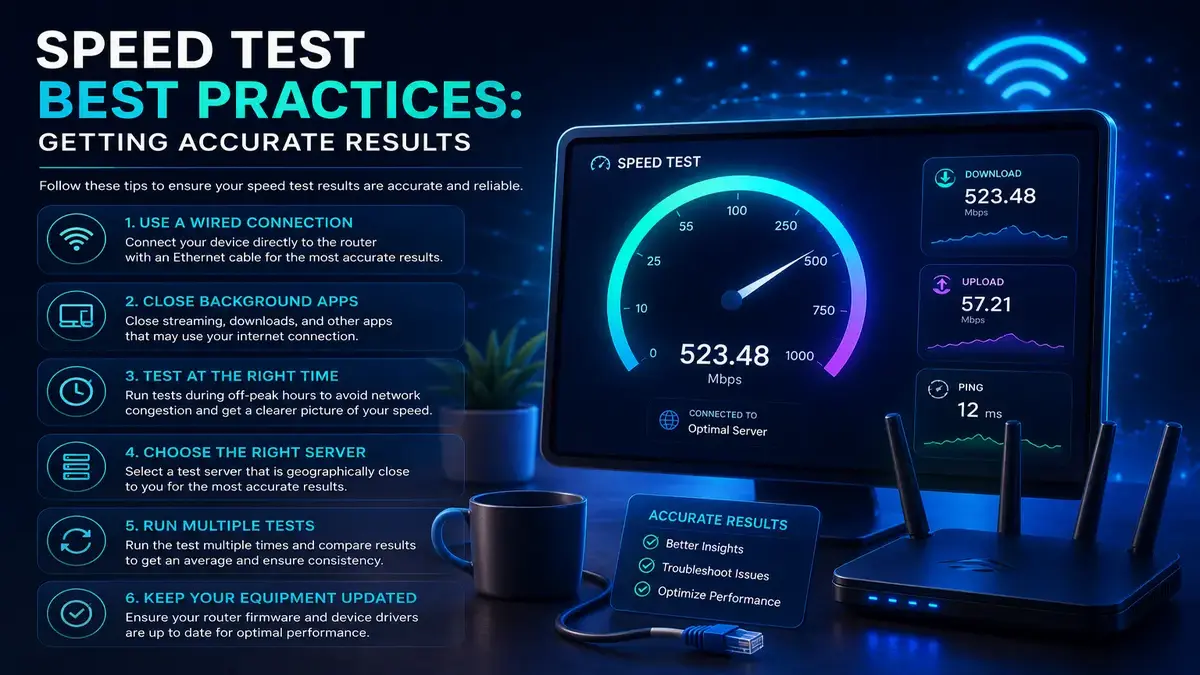
Speed Test Best Practices: Getting Accurate Results
Table of Contents
Running a speed test seems like the simplest thing in the world: open a website, click a button, and wait for a number. Yet the results people get from casual speed testing are frequently misleading, inconsistent, or simply wrong for the purpose they are trying to serve, whether that purpose is confirming they are getting what they pay for, diagnosing a slow connection, or documenting a problem for their internet service provider. Getting genuinely accurate, actionable results requires understanding a handful of factors that most casual testers never consider. Every day.
Why Speed Test Best Practices Actually Matter
A single inaccurate Speed Test Best Practices result might seem like a minor inconvenience, but the consequences compound in practice. If you are trying to determine whether your provider is delivering the speeds you are paying for, an inaccurate low reading caused by test conditions rather than actual service quality can lead to a frustrating and unproductive support call. Conversely, an inflated reading from favorable test conditions can mask a genuine, ongoing service problem that deserves attention. Accurate testing is the foundation for every decision that follows, from troubleshooting to plan upgrades to provider complaints.
The Cost of Testing Under the Wrong Conditions
Testing during a period of unusually low household network activity, on a device with weak Wi-Fi reception, or against a distant test server can each independently produce numbers that bear little resemblance to your actual everyday internet experience. Stacking several of these factors together, which happens more often than people realize, can produce a result that is off by a wide margin in either direction, leading to entirely wrong conclusions about your service.

Use a Wired Connection Whenever Possible
The single most reliable step you can take before running a Speed Test Best Practices of connecting your testing device directly to your modem or router via an Ethernet cable. Wi-Fi introduces variables that have nothing to do with your actual internet service, including signal strength, interference from other devices and networks, and the specific capabilities of your device’s wireless adapter. A wired connection removes nearly all of these variables, giving you a result that reflects your actual internet service rather than the quality of your local wireless environment at that particular moment.
Close Background Applications and Other Devices
Before testing, close streaming services, cloud backup software, large downloads, and any other bandwidth-intensive applications running on your testing device or elsewhere on your network. A single 4K stream running in another room, or a large file quietly syncing to cloud storage in the background, can consume a meaningful share of your available bandwidth without any obvious indication, skewing your test results downward in a way that has nothing to do with your provider’s actual service quality.
Choose the Right Test Server
Most speed test tools automatically select a server based on your location, but this automatic selection is not always optimal. Testing against a server that is geographically distant, or one that happens to be experiencing heavy load from other users at that moment, can produce results that understate your actual available speed. Many reputable speed test tools allow you to manually select a different server, which can be worth trying if your automatically selected result seems unexpectedly low compared to your typical experience.

Speed Test Best Practices and Test at Multiple Times of Day
Internet speeds are rarely perfectly constant throughout the day, particularly for connection types that share infrastructure with neighbors, such as cable internet. Testing only once, and only at a convenient time, gives you an incomplete picture. Running tests during your typical usage hours, including busy evening periods when neighborhood demand peaks, alongside quieter times, reveals whether you are dealing with a consistent underlying issue or one that only appears during specific high-demand windows.
Building a Speed Test Best Practices: Testing Routine Worth Trusting
Rather than treating Speed Test Best Practices as a one-off diagnostic activity, consider running a small number of tests spread across a few days whenever you need to make an important decision, such as reporting a problem or deciding whether to upgrade your plan. Averaging several results collected under varied but realistic conditions gives you a far more trustworthy picture than any single test, however carefully conducted, ever could on its own.
Understand What the Numbers Actually Mean
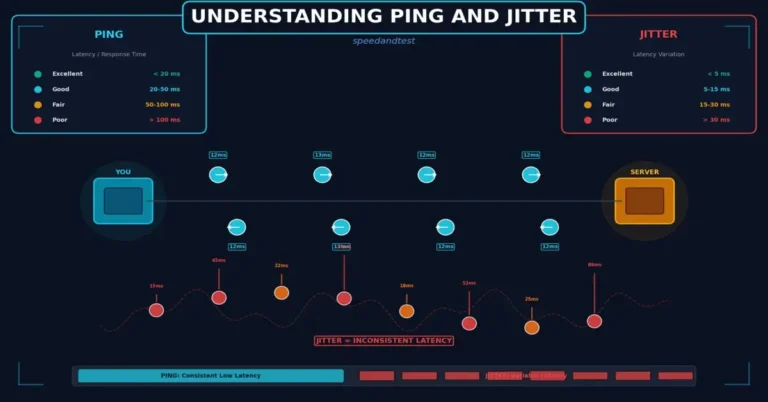
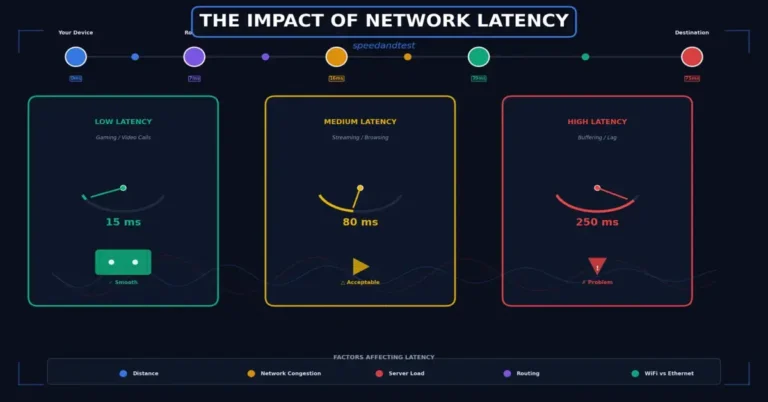
A Speed Test Best Practices typically reports download speed, upload speed, ping or latency, and sometimes jitter. Download speed matters most for typical activities like streaming and browsing, while upload speed matters more for video calls and cloud backups. Ping measures the delay in round-trip communication and matters significantly for real-time activities like gaming and video calls, while jitter measures the consistency of that delay, with high jitter causing choppy audio or video even when raw speed looks fine on paper.
Compare Results Against Your Actual Plan
Once you have several reliable readings, compare them against your plan’s advertised Speed Test Best Practices, keeping in mind that providers typically describe advertised speeds as a maximum achievable figure under ideal conditions rather than a guaranteed constant rate. Many providers and regulators consider results consistently above roughly eighty percent of the advertised rate to be within normal, acceptable operating range, though this threshold can vary by provider, region, and the specific service agreement you have signed.
- Test using a wired Ethernet connection whenever possible for the most accurate baseline reading
- Close all other applications and pause other devices on the network before testing.
- Run several Speed Test Best Practices across different times of day rather than relying on a single result.
- Try an alternate test server if your results seem inconsistent with your typical experience.
- Keep a simple log of results if you plan to discuss findings with your provider’s support team.
Documenting Results for Provider Support Conversations
If your testing consistently reveals a shortfall relative to your plan, documenting several results with timestamps, dates, and Speed Test Best Practices testing conditions gives your provider’s support team concrete evidence to work with, rather than a vague complaint about slowness. Screenshots of each test result, along with notes about whether you were using a wired or wireless connection, make for a far more productive support conversation and a much higher likelihood of a genuine resolution rather than generic troubleshooting suggestions.
Common Mistakes That Undermine Accuracy
Beyond the factors already covered, a handful of other common mistakes quietly undermine the accuracy of Speed Test Best Practices. Testing immediately after a router restart, before the connection has fully stabilized, can produce artificially low results. Testing on an older device with an outdated network adapter can bottleneck results regardless of your actual service quality. And testing through a VPN, which adds encryption overhead and an extra network hop, will almost always understate your true available speed.
How This Connects to Broader Speed Test Best Practices Topics
Accurate Speed Test Best Practices testing is the foundation for everything else you might do to improve or evaluate your internet connection. For practical steps you can take if your results reveal a genuine problem, see our guide on how to improve your internet speed, and for a deeper look at how Speed Test Best Practices testing itself works, see our article on understanding internet speed testing.
Speed Test Best Practices Testing on Mobile Devices
Testing your Speed Test Best Practices on a smartphone or tablet introduces its own considerations beyond those relevant to wired or Wi-Fi testing on a computer. Cellular data speed tests are affected by tower proximity, network congestion, and even the specific generation of cellular technology your device supports, none of which reflect your home broadband service at all. When Speed Test Best Practices testing your home Wi-Fi from a mobile device, stand close to the router during testing to minimize the influence of wireless signal strength on your results.
When Speed Test Best Practices Results Should Prompt Further Action
Not every disappointing Speed Test Best Practices result requires immediate action. Occasional dips during known peak hours, or a single unusually low reading, are often normal variation rather than a genuine problem. Persistent, repeated shortfalls across multiple days and testing conditions, however, particularly when they occur even on a wired connection with no other devices active, are a much stronger signal that something is genuinely wrong and worth investigating further or raising with your provider.
Frequently Asked Questions
Why do my Speed Test Best Practices results vary so much between attempts?
Variation is normal, driven by network congestion, server load, background activity on your network, and even the specific test server selected. Running multiple tests and looking at the overall pattern matters more than any single result.
Should I trust the Speed Test Best Practices shown on my router’s admin page instead?
Router admin pages typically show local network activity rather than your actual internet connection speed to the wider internet, so a dedicated speed test tool remains the more reliable choice for measuring your actual internet service.
Does the specific speed test website or app I use matter?
It can. Different tools use different server networks and testing methodologies, so results can vary somewhat between tools even under identical conditions. Using the same tool consistently makes your own results more comparable over time.
Is it better to test with many devices connected or just one?
For an accurate baseline measurement of your raw connection speed, test with only your testing device active. For a realistic picture of your everyday experience, testing under typical household conditions with other devices active can also be informative.
How many tests should I run before concluding?
A handful of tests, perhaps three to five, spread across different times of day over a couple of days, generally provides a much more reliable picture than relying on any single test result alone.
Can my browser affect speed test results?
In rare cases, browser extensions or heavy background tabs can slightly affect results, though this effect is typically small compared to network-level factors like wired versus wireless connections and server selection.
Should I test right after paying my internet bill or at a random time?
Timing relative to your billing cycle does not affect your actual connection speed. Test whenever you have a genuine need to check your service, ideally during your typical usage hours for the most representative results.
What is a good ping result for gaming?
Ping under roughly twenty milliseconds is considered excellent for competitive gaming, with results up to about fifty milliseconds generally still very playable for most games and most players.
Can old Ethernet cables affect my wired speed test results?
Yes, older or damaged cables, particularly older cable standards, can limit achievable speeds even on an otherwise fast connection, making a cable upgrade worth considering if your wired results seem unexpectedly low.
Does the time of month affect my internet speed?
Generally no, though some providers with data caps may throttle speeds after a household exceeds its monthly allotment, which could coincide with certain times of the month depending on your billing cycle start date.
Should I test my speed before and after a router firmware update?
This is a good practice. Comparing results before and after helps confirm whether the update improved, degraded, or had no effect on your connection’s actual performance.
Is a wireless mesh system likely to show different speeds than a single router?
Yes, mesh systems can introduce a small amount of additional latency and speed reduction compared to a direct connection to the main router node, particularly for devices connected to a satellite node farther from the main unit.
Why does my speed test result differ from what a website loading speed feels like?
Raw connection speed is only one factor in how fast a website feels. Server response time, page complexity, and DNS resolution speed all contribute independently to perceived loading speed beyond your raw connection capacity.
Accurate speed testing is a skill worth developing, since it forms the basis for nearly every other decision you might make about your internet service, from troubleshooting to plan comparisons to provider complaints. According to the FCC’s broadband speed guide, understanding your actual measured performance relative to your plan’s advertised speed is an essential first step in evaluating whether your internet service is meeting your household’s genuine needs.



One Comment