
Network Latency: Causes and How to Reduce It
Table of Contents
When people think about internet performance, download speed usually comes to mind first, but Networks Latency, the delay it takes for data to travel between your device and a destination server, often has a far bigger impact on how a connection actually feels in daily use. A connection with modest download speed but low latency can feel snappier and more responsive than a much faster connection burdened with high latency. Understanding what network latency actually is, what causes it, and how it affects different online activities is essential for anyone trying to diagnose a frustrating, laggy experience that a simple speed test alone cannot explain.
Networks Latency Measures
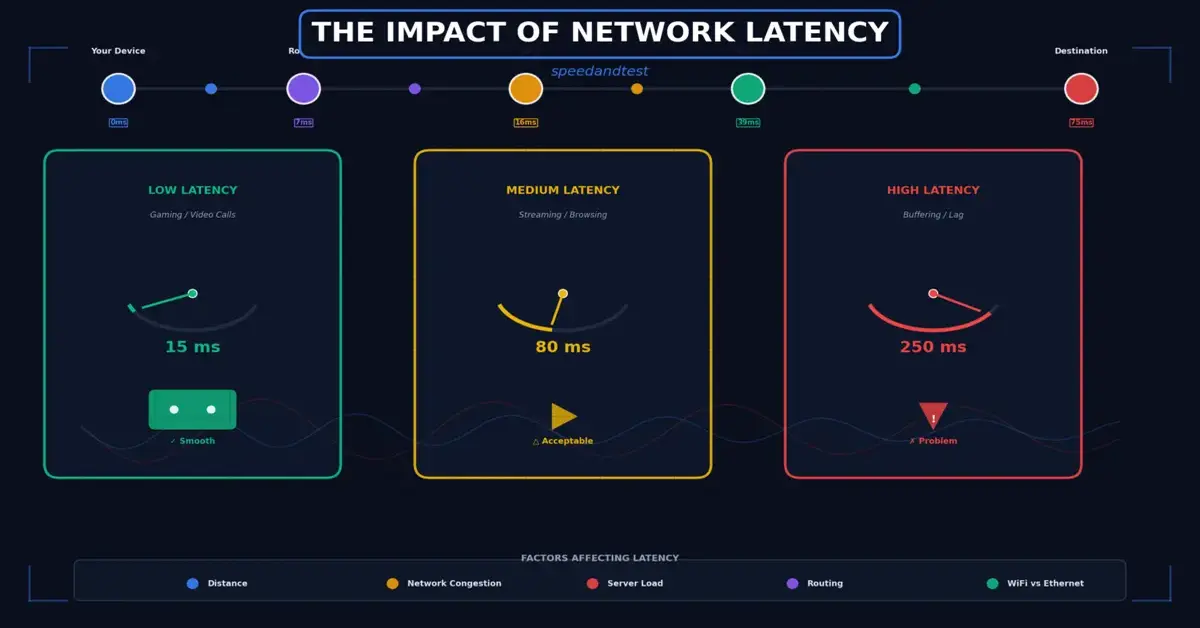
Networks Latency, commonly measured as ping and expressed in milliseconds, represents the round-trip time for a small packet of data to travel from your device to a destination server and back again. Unlike download and upload speed, which measure how much data can move per second, latency measures how quickly individual pieces of data can make that round trip, a distinction that matters enormously for interactive, real-time applications where responsiveness matters more than raw throughput.
Why Milliseconds Matter More Than They Sound
A difference of even twenty or thirty milliseconds, imperceptible in most everyday browsing, becomes clearly noticeable in competitive gaming, professional video conferencing, and other interactive real-time applications where every fraction of a second of delay compounds into a perceptible lag between action and response.

What Causes High Networks Latency
Latency is influenced by several factors working together. Physical distance to the server you are communicating with plays a fundamental role, since data cannot travel faster than the speed of light allows through fiber optic cables. Network congestion, the number of intermediate hops your data passes through, and the underlying connection type, such as satellite versus fiber, all add additional delay on top of this basic physical distance factor.
Connection Type and Its Effect on Networks Latency
Different connection types have dramatically different baseline latency characteristics. Fiber connections typically offer the lowest Networks Latency, often under twenty milliseconds to nearby servers. Cable and DSL connections generally fall into a moderate range. Satellite internet, due to the enormous physical distance data must travel to reach an orbiting satellite and back, typically carries the highest latency of any common connection type, often several hundred milliseconds even under ideal conditions.
How Networks Latency Affects Different Activities
The practical impact of Networks Latency varies enormously depending on what you are actually doing online. Streaming video and downloading files are relatively tolerant of latency, since buffering absorbs small delays without any noticeable effect on the viewing or download experience. Online gaming, video conferencing, and remote desktop applications, by contrast, are highly sensitive to latency, where even modest delays translate directly into a laggy, frustrating, disjointed experience.
Understanding Jitter Alongside Networks Latency
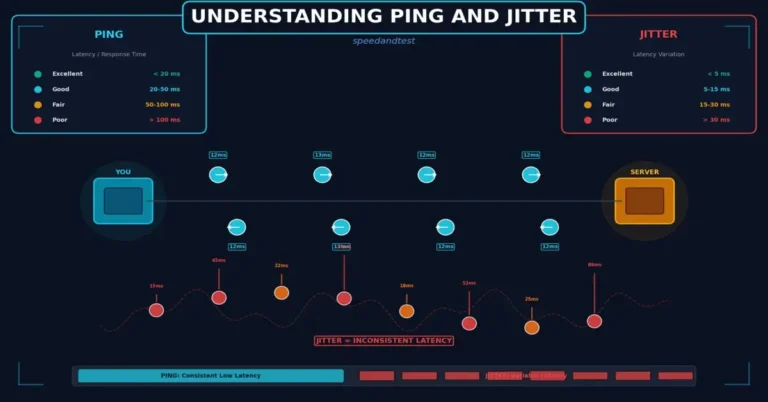
Jitter refers to the variation in latency over time rather than the latency figure itself. A connection with consistent latency of eighty milliseconds is often more usable for real-time applications than one that fluctuates unpredictably between twenty and two hundred milliseconds, even though the second connection might have a lower average. This inconsistency is what causes choppy audio, stuttering video, and unpredictable input lag in gaming, even when a speed test’s average numbers look reasonably acceptable.
Reducing Networks Latency on Your Home Network
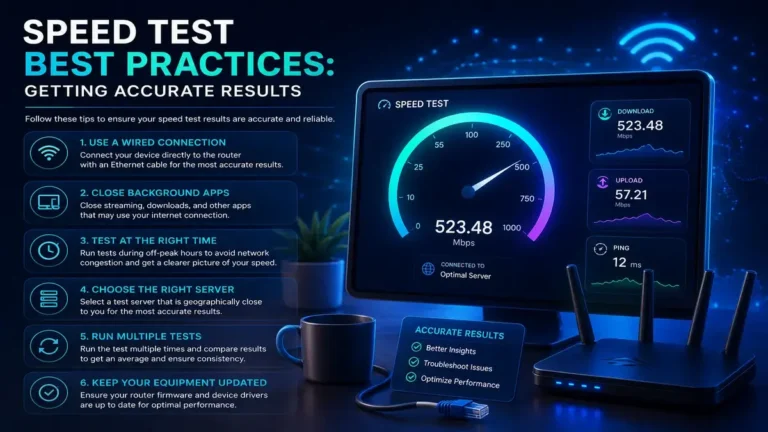
While you cannot change the physical distance to a distant server, several home network factors within your control do meaningfully affect the latency you experience. Using a wired Ethernet connection instead of Wi-Fi eliminates wireless-specific latency overhead. Closing bandwidth-heavy background applications reduces queuing delay on your own network. And selecting game servers or video call regions closer to your physical location reduces the underlying distance-based latency floor.
- Use a wired Ethernet connection for Networks Latency-sensitive activities whenever possible
- Close bandwidth-heavy background applications that can introduce queuing delay
- Choose game servers or conferencing regions physically closer to your location
- Configure Quality of Service settings to prioritize real-time traffic during busy periods
- Avoid using a VPN for latency-sensitive activities unless it specifically improves your routing
The Role of Your Internet Service Provider’s Networks Latency
Beyond your home network, latency is also shaped by your provider’s own network architecture and its connections, known as peering arrangements, to other networks. Providers with well-optimized peering to major content delivery networks and gaming infrastructure can offer meaningfully lower latency to popular destinations than providers with less optimized routing, even when advertised download speeds are otherwise similar.
Testing and Measuring Your Networks Latency
Most speed test tools report a ping figure alongside download and upload speed, but dedicated tools that test against specific game servers or perform continuous ping monitoring over time can provide a more nuanced picture, particularly for diagnosing intermittent latency spikes that a single quick test might miss entirely. Running a continuous ping test during a period when you notice lag can help correlate specific moments of poor performance with measurable Networks Latency spikes.
When High Networks Latency Signals a Deeper Problem
Consistently high or highly variable latency, even on an otherwise fast connection, can indicate underlying network problems worth investigating, such as outdated equipment, Wi-Fi interference, or provider-side congestion. Unlike occasional latency spikes during peak hours, which are relatively normal, persistent high latency across varied conditions and times of day is a stronger signal that something specific and addressable is going wrong.
How This Connects to Broader Networks Latency Topics
Latency is closely connected to several other aspects of network performance worth understanding together. For a deeper dive into jitter and related metrics, see our guide on understanding ping and jitter, and for a comparison of how connection type affects latency and reliability, see our article on Wi-Fi versus Ethernet.
Networks Latency in Cloud Gaming and Remote Work
Emerging technologies like cloud gaming, where the actual game runs on a remote server rather than your local device, and remote desktop tools used for professional work are exceptionally sensitive to Networks Latency, often requiring consistently low and stable latency to feel genuinely usable rather than frustratingly laggy. As these technologies become more widespread, understanding and optimizing for latency, rather than focusing exclusively on raw download speed, becomes an increasingly important part of ensuring a good experience with these newer, more demanding use cases.
Networks Latency and Voice Over IP Communication
Voice over IP calling, whether through dedicated business phone systems or consumer video conferencing applications, is particularly sensitive to both Networks Latency and jitter. Delays above roughly one hundred fifty milliseconds become noticeable to participants as an awkward conversational lag, while inconsistent jitter causes choppy, garbled audio even when the average latency figure appears acceptable. For households or businesses relying heavily on voice or video communication, prioritizing low, consistent latency over raw download speed often produces a more noticeably improved experience.
Measuring Latency Over Time Rather Than Once
A single ping measurement provides only a momentary snapshot that may not represent your typical experience. Running continuous or repeated Networks Latency tests over an extended period, particularly during the specific times of day when you notice problems, reveals patterns that a one-time test would miss entirely, such as latency that only spikes during neighborhood peak hours or during specific activities happening elsewhere on your network.
The Relationship Between Latency and Packet Loss
Packet loss, where data packets fail to arrive at their destination and must be retransmitted, compounds the negative effects of high latency significantly. Each retransmission effectively doubles the delay for that particular piece of data, meaning a connection with both elevated latency and even modest packet loss can feel dramatically worse than either issue would independently suggest, making packet loss an important factor to check alongside latency when diagnosing a persistently poor real-time experience.
Frequently Asked Questions
What is considered a good latency for online gaming?
Under twenty milliseconds is considered excellent for competitive gaming, with results up to about fifty milliseconds still generally very playable for most games and most players.
Can a fast download speed compensate for high latency?
No, download speed and latency measure fundamentally different things. A fast connection with high latency will still feel laggy for real-time activities regardless of how much raw bandwidth is available.
Why does my latency spike during certain times of day?
Network congestion during peak usage hours, when many users in your area are simultaneously active, commonly causes latency spikes that are less noticeable during quieter periods of the day.
Does a VPN always increase latency?
Usually, yes, since routing through an intermediate VPN server adds a hop and distance. In some cases, however, a VPN can improve latency if it provides a more efficient route than your default path.
Is satellite internet ever suitable for latency-sensitive activities?
Traditional satellite internet is generally unsuitable due to high inherent latency, though newer low-earth-orbit satellite services have significantly reduced latency compared to older geostationary satellite systems.
How does physical distance to a server affect latency?
Data cannot travel faster than the speed of light through fiber optic cables, so greater physical distance to a server directly and unavoidably increases the minimum achievable latency for that connection.
Can my router itself add noticeable latency?
Yes, particularly an older or overloaded router processing many simultaneous connections can introduce measurable additional latency compared to a modern, adequately provisioned router.
Should I choose the closest game server even if it has fewer players?
Generally yes for latency-sensitive competitive games, since the latency benefit of a closer server usually outweighs a modest reduction in matchmaking pool size for most players.
Does jitter matter more than average latency for video calls?
Both matter, but consistent jitter is often more disruptive, since unpredictable variation causes choppy audio and stuttering video even when the average latency figure looks acceptable on paper.
Can wired connections eliminate latency?
No, wired connections reduce latency compared to Wi-Fi by eliminating wireless overhead, but some baseline latency from physical distance and network routing always remains regardless of connection type.
Is high latency more common with cable or fiber internet?
Fiber generally offers lower and more consistent latency than cable, due to differences in the underlying infrastructure and how each connection type handles data transmission and network congestion.
How can I tell if latency issues are caused by my home network or my provider?
Compare wired versus wireless latency on your own network first. If wired latency is also high and inconsistent, the issue is more likely to originate with your provider or their broader network routing.
Does packet loss affect latency directly?
Not directly, but packet loss forces retransmission of lost data, which effectively adds significant additional delay on top of the connection’s baseline latency, compounding the negative impact on real-time applications.
Is latency more important than download speed for video conferencing?
For most video conferencing, low and consistent latency matters more than raw download speed, since conferencing applications require relatively modest bandwidth but are highly sensitive to delay and jitter.
Can upgrading my internet plan reduce latency?
Sometimes, particularly if switching to a fundamentally different connection type like fiber, but simply upgrading to a faster tier on the same connection type often has minimal effect on latency itself.
Why does latency sometimes increase during a video call but not at other times?
Sustained upload demand from video calling, combined with other network activity, can cause queuing delay that increases latency specifically during the call, particularly on connections with limited upload bandwidth.
Does the specific device I use affect measured latency?
Slightly, an older device with a slower network stack or an overloaded processor can introduce a small amount of additional processing delay on top of the network’s actual transmission latency.
Should I prioritize latency or bandwidth when choosing an internet plan for gaming?
For competitive gaming, prioritize a connection type known for low latency, such as fiber, since bandwidth requirements for most games are modest compared to their sensitivity to delay.
Understanding network latency transforms vague complaints about a connection “feeling slow” into a specific, measurable, and addressable factor distinct from raw download speed. According to Cloudflare’s glossary entry on latency, recognizing the difference between throughput and responsiveness is essential for accurately diagnosing performance issues in real-time, interactive applications.



2 Comments