Internet Connection Analyzer: Unlock Better Performance
Table of Contents
You ran a speed test. You got three numbers: download, upload, ping. Now what? Knowing you have “87 Mbps down” doesn’t tell you whether that’s enough for your work video calls, your kid’s online gaming, or the four devices streaming in different rooms at once. That gap, between a raw number and an actual answer, is exactly what an internet connection analyzer is built to close.
This isn’t another guide on how to click “Start Test.” It’s about what happens after you have your numbers: how a proper analyzer turns them into a real diagnosis you can act on, and why that matters more than the numbers themselves.
A Speed Test Tells You What. An Analyzer Tells You Why.
A standard speed test measures three or four things and stops there. It hands you a download figure, an upload figure, maybe ping and jitter, and leaves you to interpret what any of it means for your actual life.
An internet connection analyzer takes that same raw data and does the interpretation for you. Instead of a number in isolation, you get context: is this good enough for a 4K stream? Will it hold up during a video call while someone else in the house is gaming? Is your ping low enough for competitive online play?
That shift, from raw measurement to applied meaning, is the entire point. Numbers without context are trivia. Numbers matched against your real activities are useful.
What Actually Goes Into an Internet Connection Analyzer Score
A well-built internet connection analyzer usually distills your results into a single, easy-to-read score, but that score isn’t pulled from nowhere. It’s built from the same core measurements a speed test already collects, weighted against real-world thresholds.
Download Speed
Download speed determines how fast content arrives on your side: streaming quality, page loads, file downloads. This is the number most people fixate on, and for good reason, but it’s only part of the picture.
Upload Speed
Upload speed matters just as much for anyone on video calls, uploading large files, or livestreaming. A connection with fast downloads and weak uploads can still leave you frozen mid-sentence on a work call.
Ping (Latency)
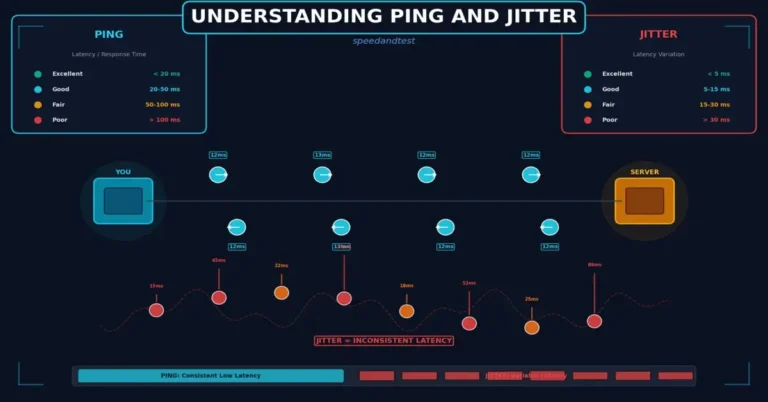
Ping measures how long it takes a signal to make a round trip to a server and back. Low ping matters enormously for anything real-time: video calls, online gaming, voice chat. High download speed cannot fix bad ping.
Jitter
Jitter tracks how consistent your ping is over time. A connection that swings wildly between 20ms and 200ms causes stutter and dropped frames even if the average looks fine on paper.
An internet connection analyzer weighs all four together against activity-specific benchmarks, which is why two connections with identical download speeds can end up with very different scores once upload, ping, and jitter are factored in.
Why Your Score Changes by Activity
Here’s something a plain speed test never tells you: “good enough” depends entirely on what you’re doing, and the FCC’s own broadband speed guide lays out roughly how much you need for common activities.

- Video calls need reliable upload speed and low, stable ping more than raw download power. A call can lag badly on a connection that scores great for streaming.
- Gaming cares almost exclusively about ping and jitter. A 500 Mbps connection with 80ms of jittery ping will still feel sluggish in a fast-paced match.
- Streaming leans hard on sustained download speed, especially at 4K, but tolerates modest ping just fine.
- Smart home devices individually need very little bandwidth, but a house full of them running simultaneously adds up fast, and that’s where a lot of “why does my WiFi feel slow” complaints actually originate.
A connection analyzer that breaks your score down by activity, rather than handing you one flat number, is telling you something a basic test physically cannot: which parts of your digital life are covered, and which ones aren’t.
How to Read Your Analyzer Results Without Getting Lost
Getting a detailed breakdown is only useful if you know what to do with it. Here’s how to actually use it.
- Start with the overall score, then drill into activities. The headline number gives you a quick read; the activity breakdown tells you where the actual gap is.
- Compare against your real usage, not a generic benchmark. A household of one working from home has very different needs than a family of five streaming, gaming, and video-calling simultaneously.
- Run it more than once. A single test is a snapshot. Testing at different times of day reveals whether your ISP throttles during peak hours, something one-off results can’t show you.
- Note what’s weak, not just what’s low. A low score paired with high jitter points to a stability problem. A low score with clean, consistent numbers points to a plan that’s simply too small.
- Treat it as a starting point for troubleshooting, not a final verdict. A bad score tells you something is off; figuring out whether it’s your router, your ISP, or local congestion is the next step.
Quick Checklist Before You Trust a Low Score
- Check whether anyone else on your network is streaming or downloading right now.
- Test both over Wi-Fi and, if possible, on a direct Ethernet connection
- Run it again at a different time of day before assuming it’s a permanent problem
- Note whether the drop is in download, upload, ping, or jitter specifically
Common Reasons Your Score Comes Back Lower Than Expected
Plenty of factors drag a connection analyzer’s score down that have nothing to do with the plan you’re paying for.

Wi-Fi congestion. Too many devices on one router, or a router placed far from where you actually use the internet, tanks real-world performance even when your plan is fine on paper.
Peak-hour slowdown. ISPs experience heavier load in the evening, and shared neighborhood infrastructure can genuinely slow down when everyone streams at once.
Outdated hardware. A five-year-old router or an old modem can bottleneck a connection no matter how fast your plan is rated.
Background usage. Automatic backups, game downloads, and other devices quietly eating bandwidth in the background can tank a test you didn’t realize was competing for resources.
Wired vs. wireless. Testing over Wi-Fi versus a direct Ethernet connection can produce meaningfully different scores, and it’s worth checking both if your results feel inconsistent.
Who Actually Needs This Level of Detail?
A one-line speed number is enough for plenty of people, but an internet connection analyzer earns its keep in specific situations.

Remote workers depend on stable upload speed and low ping for video calls, and a basic download-focused test misses exactly the metric that matters most for their day.
Households with multiple heavy users need to know whether their plan can genuinely support simultaneous streaming, gaming, and video calls, not just whether it hits a headline number when nothing else is running.
Gamers care about ping and jitter far more than raw download speed, and a connection analyzer that breaks those out separately tells them something a generic test buries in an average.
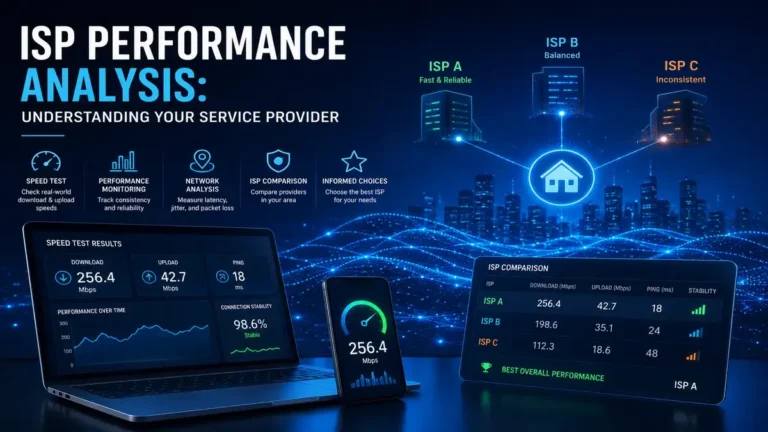
Anyone about to negotiate with their ISP or upgrade their plan benefits from a documented, activity-specific breakdown instead of a vague sense that “the Internet Connection Analyzer feels slow,” which is a much stronger starting point for that conversation.
People troubleshooting an intermittent problem get more value from repeated Internet Connection Analyzer runs than from a single test, since intermittent issues often only show up as patterns across multiple results, not in any one snapshot.
Tracking Your Score Over Time
A single internet connection analyzer result is a snapshot. Running it regularly turns that snapshot into a trend, and trends are where the real diagnostic value shows up.
If your score stays consistent across different times of day, your Internet Connection Analyzer is stable, even if the number itself isn’t spectacular. If it dips predictably every evening, that points toward peak-hour congestion rather than a fundamentally undersized plan. If it’s erratic with no obvious pattern, that’s often a sign of a local hardware issue, an aging router, interference, or a failing cable, rather than anything on your ISP’s end.
Keeping even a simple log- date, time, and score- turns a one-off complaint into evidence you can act on, whether that means rearranging your router, upgrading hardware, or having a much more specific conversation with your provider.
Try Internet Connection Analyzer
Our own Internet Connection Analyzer runs the full test, then turns your download, upload, ping, and jitter into a personalized Internet Connection Analyzer Score with an activity-by-activity breakdown, so you know exactly where you stand for calls, gaming, and streaming, not just an abstract number. It’s free, takes under a minute, and gives you clear next steps instead of just raw data.
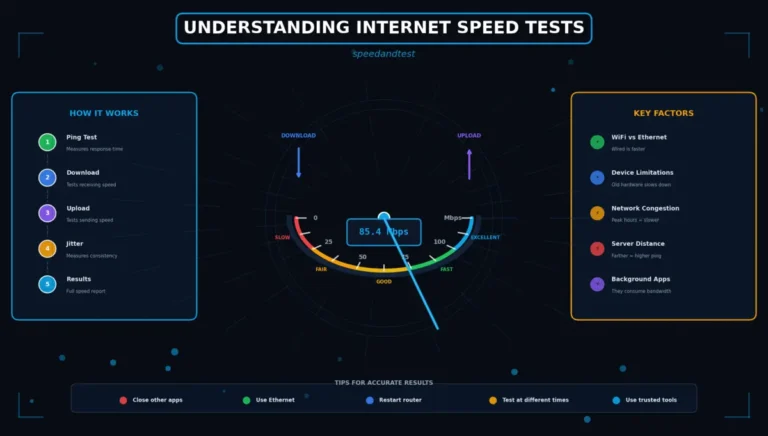
If you want to understand what your numbers actually mean before you dig into a full analysis, our guide on understanding Internet Connection Analyzer speed tests walks through what download, upload, and ping measure at a fundamental level.
Internet Connection Analyzer vs. Basic Test: When You Need Which
A quick single-number speed test still has its place. If you just want to confirm your connection is technically online and roughly in the range your ISP promised, that’s a thirty-second job.
But the moment you’re trying to answer a real question- why video calls keep freezing, whether your plan actually supports 4K streaming for the whole household, whether it’s worth upgrading your router before your ISP plan- a basic test leaves you guessing. That’s precisely the gap an internet connection analyzer is designed to close: it turns “the number is X” into “here’s what X means for what you’re actually trying to do.”
Mistakes That Skew Your Results
Testing during heavy household use. Running an analysis while someone else streams 4K or downloads a large game will legitimately lower your score, and it’s not a fair read of your connection’s real capacity.
Only testing once. One result is a snapshot, not a pattern. Weak spots like inconsistent jitter only show up across repeated tests.
Ignoring the server location. A test routed through a distant server adds latency that has nothing to do with your actual connection quality.
Comparing your score to an unrelated household. Your neighbor’s five-person, six-device home has different bandwidth needs than a one-person apartment, and comparing raw scores without that context is misleading.
Frequently Asked Questions
What is an internet connection analyzer?
It’s a tool that runs the same core measurements as a speed test- download, upload, ping, and jitter- and then interprets them against real-world activities like streaming, gaming, and video calls, usually producing a single easy-to-read performance score.
How is an internet connection analyzer different from a regular speed test?
A regular speed test gives you raw numbers and stops. A connection analyzer takes those same numbers and tells you what they mean: whether your connection can comfortably handle specific activities, and where the weak points are.
Why did my internet connection analyzer score come back lower than expected?
Common culprits include Wi-Fi congestion, outdated routers, peak-hour ISP slowdown, background devices competing for bandwidth, or testing over Wi-Fi instead of a direct wired connection.
How often should I run an internet connection analyzer test?
Testing at a few different times of day, and on both Wi-Fi and Ethernet if possible, gives you a much more reliable picture than a single test, especially if you suspect inconsistent performance rather than a flat, permanently slow connection.
Can an internet connection analyzer tell me if my ISP is throttling my connection?
It can suggest it. Consistent results that drop sharply during specific hours, especially evenings, are a common sign of peak-time congestion or throttling, though confirming it for certain usually requires comparing results against your ISP’s stated plan speeds over time.
Get Your Real Answer, Not Just a Number
You don’t have to guess whether “good enough” download speed is actually good enough for what you do every day. Run a full analysis, see your score broken down by the activities that matter to you, and get a real answer instead of three numbers you have to interpret yourself. Try the Internet Performance Analyzer now and find out exactly where your connection stands.