Network Optimization and Speed Testing: Better Results
Table of Contents
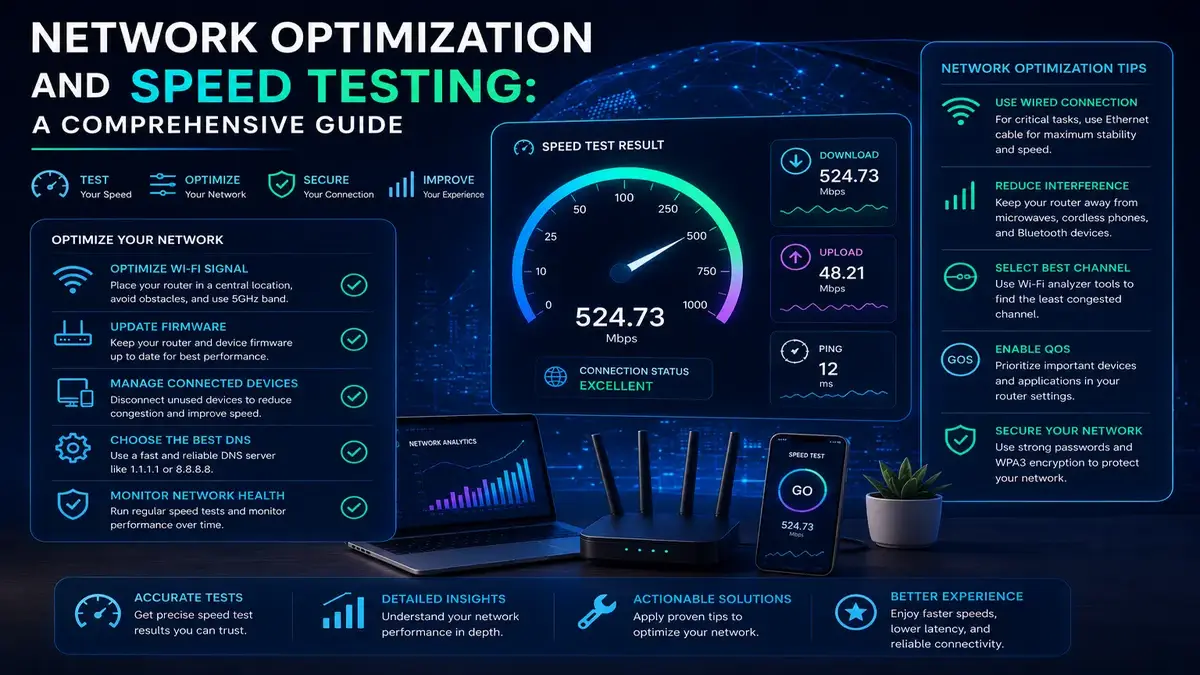
Network Optimization and Speed Testing are two sides of the same coin, yet most guides treat them as entirely separate topics, leaving readers with either a way to measure their connection or a way to improve it, but rarely both woven together into a single, coherent approach. This comprehensive guide bridges that gap, walking through how to accurately measure your network’s performance and then use those measurements to guide targeted, effective optimization efforts. Whether you are troubleshooting a specific problem or simply want to get the most out of your existing internet plan, understanding this connection between measurement and improvement is the key to lasting results.
Why Measurement Should Come Before Network Optimization and Speed Testing
A common mistake is jumping straight to optimization tactics, like buying a new router or repositioning equipment, without first establishing a clear, accurate baseline of current performance. Without a baseline, it becomes almost impossible to know whether any given change actually helped, made no difference, or even made things worse. Establishing accurate before-and-after measurements transforms optimization from guesswork into a genuinely evidence-based process with results you can actually verify.
Building a Reliable Baseline
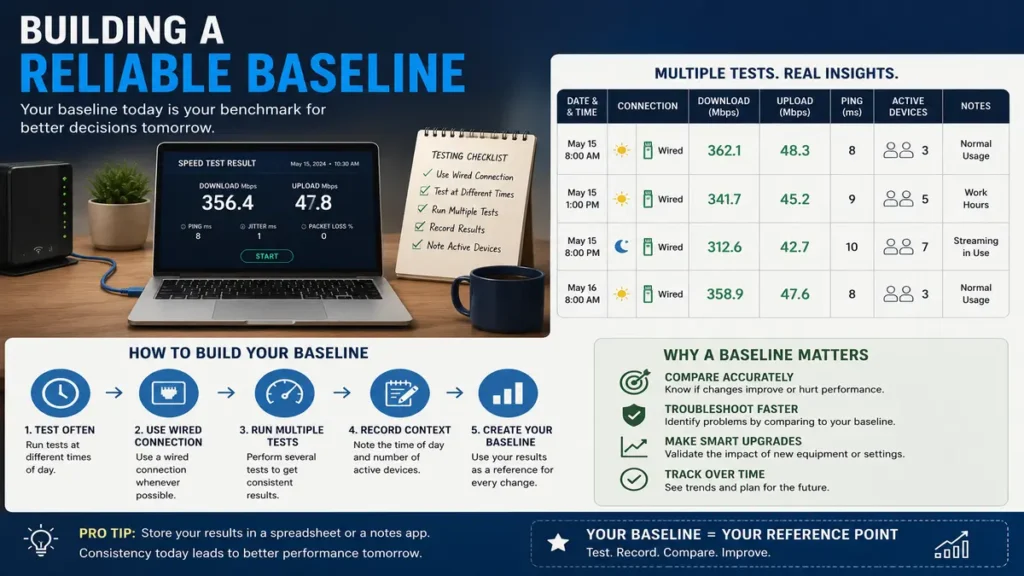
A reliable baseline requires more than a single speed test. Run several tests across different times of day, using a wired connection where possible, and record the results alongside relevant context like the number of active devices and the time of day. This baseline becomes your reference point for evaluating every subsequent change you make to your network.
Diagnosing Where Bottlenecks Actually Live
Once you have a baseline, the next step is identifying where bottlenecks in your network actually exist. Comparing wired versus wireless speed tests reveals whether your Wi-Fi is the limiting factor. Testing at different times of day reveals whether congestion, either from your household or your neighborhood’s shared infrastructure, plays a role. And testing from different locations around your home reveals whether router placement or physical obstructions are limiting coverage in specific areas.
Network Optimization and Speed Testing: Router Configuration
Your router’s configuration offers several genuinely effective levers for improving performance without any additional spending. Selecting the least congested Wi-Fi channel, particularly on the crowded 2.4 gigahertz band, updating firmware to the latest version, and enabling Quality of Service features to prioritize important traffic can each independently produce a measurable improvement, and their effects often compound when applied together as part of a broader Network Optimization and Speed Testing effort.
Physical Network Optimization and Speed Testing Layout and Equipment Placement
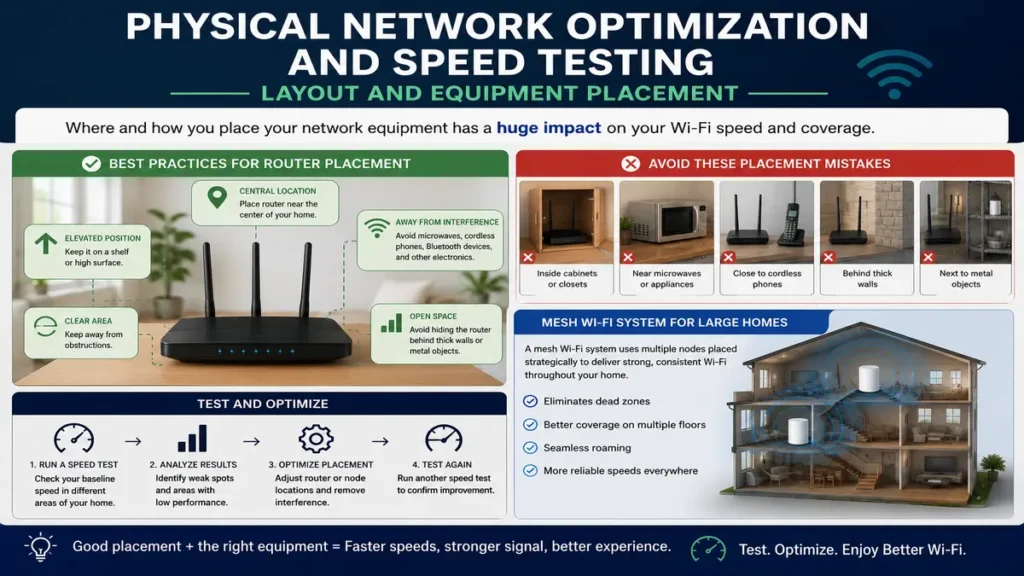
Physical factors have an outsized influence on wireless network performance that pure software Network Optimization and Speed Testing cannot fully overcome. Central, elevated router placement, away from thick walls, metal objects, and electronic interference sources like microwaves and cordless phones, meaningfully improves coverage. For larger homes, a mesh Wi-Fi system with strategically placed nodes typically outperforms a single router trying to cover an entire multi-story house from one fixed location.
Wired Connections for Maximum Reliability
For any device where consistent performance genuinely matters, such as a gaming console, desktop computer, or a dedicated home office setup, a wired Ethernet connection remains the single most reliable option for network optimization and Speed Testing available. Wired connections eliminate the variability inherent to wireless signals entirely, delivering consistent speed and the lowest possible latency for demanding applications like competitive gaming, video conferencing, and large file transfers.
Managing Bandwidth Across Multiple Devices
Modern households often have dozens of connected devices competing for the same finite bandwidth simultaneously. Understanding which devices and activities consume the most bandwidth, and configuring your router to prioritize important traffic during periods of high demand, prevents a single bandwidth-heavy activity, like a large software update or 4K stream, from degrading the experience for everyone else on the network at the same time.
- Establish an accurate baseline using multiple wired speed tests before making any changes.
- Optimize router channel selection and update firmware to the latest available version.
- Position your router centrally and elevated, away from obstructions and interference sources.
- Use wired Ethernet connections for devices where consistent performance matters most.
- Re-test after each change to verify it actually produced a measurable improvement
Segmenting Your Network: Optimization and Speed Testing for Better Performance
Creating a separate network, or a distinct virtual local area network, for smart home devices, guest access, or less trusted equipment can meaningfully improve both security and performance on your primary Network Optimization and Speed Testing. This segmentation prevents a compromised or misbehaving smart device from consuming bandwidth that would otherwise be available to your primary devices, while also containing potential security issues to a less sensitive part of your overall home Network Optimization and Speed Testing.
The Ongoing Cycle of Measurement and Adjustment
Effective Network Optimization and Speed Testing optimization one-time project but an ongoing cycle of measuring, adjusting, and re-measuring. As you add new devices, your usage patterns evolve, or your neighborhood’s shared infrastructure becomes more congested over time, periodically revisiting your baseline measurements and adjusting your configuration accordingly keeps your network performing at its best rather than gradually degrading unnoticed over months or years.
When Network Optimization and Speed Testing Reaches Its Limits
It is worth recognizing when you have reached the practical limits of what Network Optimization and Speed Testing alone can achieve. If wired speed tests consistently fall short of your plan’s advertised rate even after thorough optimization, the bottleneck likely lies with your equipment’s age, your provider’s infrastructure, or your plan’s actual capacity rather than anything further you can address through configuration changes at home.
How This Connects to Broader Network Optimization and Speed Testing Topics
Network Optimization and Speed Testing works best when grounded in accurate measurement from the start. For a deeper look at getting the most reliable speed test results, see our guide on speed test best practices, and for a broader view of maximizing your overall connection, see our article on our internet performance guide.
Advanced Network Optimization and Speed Testing for Power Users
For households with particularly demanding needs, such as multiple simultaneous 4K streams, competitive online gaming, and remote work video calls all happening at once, more advanced optimization techniques become worthwhile. This can include configuring detailed Quality of Service rules for specific applications, using dedicated access points rather than relying solely on a router’s built-in wireless radios, and monitoring bandwidth usage per device over time to catch unexpected consumption patterns before they become a persistent problem.
Documenting Your Network Optimization and Speed Testing Journey
Keeping a simple record of the changes you make and their measured effects builds valuable institutional knowledge about your specific network and home environment. This record becomes especially useful when troubleshooting future issues, since you can quickly rule out configurations you have already tried and confirmed either helped or made no meaningful difference in your particular setup.
Optimizing for Specific Use Cases
Different households have different optimization priorities depending on how they actually use their network day to day. A household centered around remote work video calls should prioritize low latency and upload bandwidth, while a household focused on large-scale streaming and downloads should prioritize sustained download throughput. Tailoring your optimization approach to your household’s genuine primary use case, rather than optimizing generically for every possible scenario at once, tends to produce results that feel more meaningfully impactful in daily life.
It is also worth periodically reassessing your primary use case, since household needs shift over time as work arrangements change, children grow older and add more devices, or new smart home technology gets introduced. An optimization approach that made sense two years ago may no longer align well with how your household actually uses its network today, making periodic reassessment a valuable part of any long-term optimization strategy.
Working With Your Internet Service Provider
Some optimization opportunities require cooperation from your internet service provider rather than changes you can make entirely on your own. Requesting a line quality check for cable or DSL connections, confirming your modem is provisioned correctly for your plan’s actual speed tier, and asking about known local congestion issues can each reveal provider-side factors that no amount of home network optimization alone could ever resolve.
Frequently Asked Questions
How often should I re-test my network after making optimization changes?
Test immediately after each change to isolate its specific effect, then periodically thereafter, perhaps every few months, to catch gradual degradation before it becomes a significant, noticeable problem.
Is it worth optimizing my network if my plan itself is relatively slow?
Yes. Optimization ensures you are getting the maximum possible performance from whatever plan you have, even if a plan upgrade would still be the more impactful change for genuinely bandwidth-limited households.
Can too many optimization changes at once make troubleshooting harder?
Yes, changing multiple settings simultaneously makes it difficult to identify which specific change caused an improvement or a problem. Making one change at a time and re-testing between each is a more reliable approach.
Does network segmentation really improve performance noticeably?
It can, particularly in homes with many smart devices, by preventing less important traffic from competing with your primary devices, though the improvement is generally more modest than router placement or wired connections.
Should I optimize for peak hours or average usage?
Optimize primarily for your household’s actual peak usage hours, since that is when bottlenecks are most likely to become noticeable and disruptive to your daily activities and important tasks.
How do I know if my router itself needs replacing rather than reconfiguring?
If your router is more than four or five years old, lacks support for current Wi-Fi standards, or cannot be reconfigured to resolve persistent issues despite genuine effort, replacement is likely more effective than continued reconfiguration.
Is mesh Wi-Fi always better than a single router for optimization?
For larger homes or homes with multiple floors, generally yes. For smaller homes or apartments, a single well-placed, modern router can often perform just as well without the added cost of a mesh system.
Can Quality of Service settings hurt performance if configured incorrectly?
Yes, overly aggressive or poorly configured QoS rules can inadvertently throttle traffic that should be prioritized, so testing after configuration changes and adjusting as needed remains important.
How much can optimization realistically improve my measured speed?
Results vary widely, but addressing Wi-Fi interference, outdated equipment, and router placement issues can sometimes double effective real-world speeds in homes where these factors were previously significant limiting problems.
Should I hire a professional for network optimization?
For straightforward homes, most optimization is achievable independently using this guide’s steps. For complex, larger properties or persistent unresolved issues, a professional network technician can be a worthwhile investment.
Does the number of connected smart devices affect optimization strategy?
Yes, households with many smart devices benefit particularly from network segmentation and bandwidth management, since these devices collectively consume meaningful resources even when individually undemanding.
Can weather or seasonal changes affect my optimized network’s performance?
For most wired connections, minimal effect. Wireless signal propagation can be subtly affected by humidity and foliage growth around outdoor equipment, though this is typically a minor factor compared to configuration and placement.
Should I ask my provider to check my line quality?
Yes, particularly if optimization at home has not resolved persistent shortfalls, since a line quality check can reveal provider-side infrastructure issues that no home configuration change could ever fix.
Does upgrading my internet plan make home optimization unnecessary?
No, even a fast plan benefits from good router placement, wired connections for important devices, and network segmentation, since these factors affect how efficiently your available bandwidth is actually used.
How do I prioritize which optimization step to try first?
Start with the highest-impact, lowest-cost changes first: establishing a baseline, optimizing router placement, and updating firmware, before considering equipment purchases or more advanced configuration changes.
Can old cabling in my walls limit my optimization results?
Yes, particularly for wired connections run through older in-wall cabling that may not support current speed standards, making a professional cabling assessment worthwhile for consistently underperforming wired connections.
Is it worth optimizing a network that already feels fast enough?
Yes, proactive optimization and periodic re-baselining help you catch gradual degradation early, before it becomes noticeable enough to disrupt daily use, rather than only reacting once problems are already obvious.
Network optimization grounded in accurate, ongoing measurement transforms a frustrating, trial-and-error process into a systematic approach with genuinely verifiable results. According to Cloudflare’s overview of the network layer, understanding how data actually moves across your network provides valuable context for making informed, targeted optimization decisions rather than relying on generic advice alone.